
About this ride
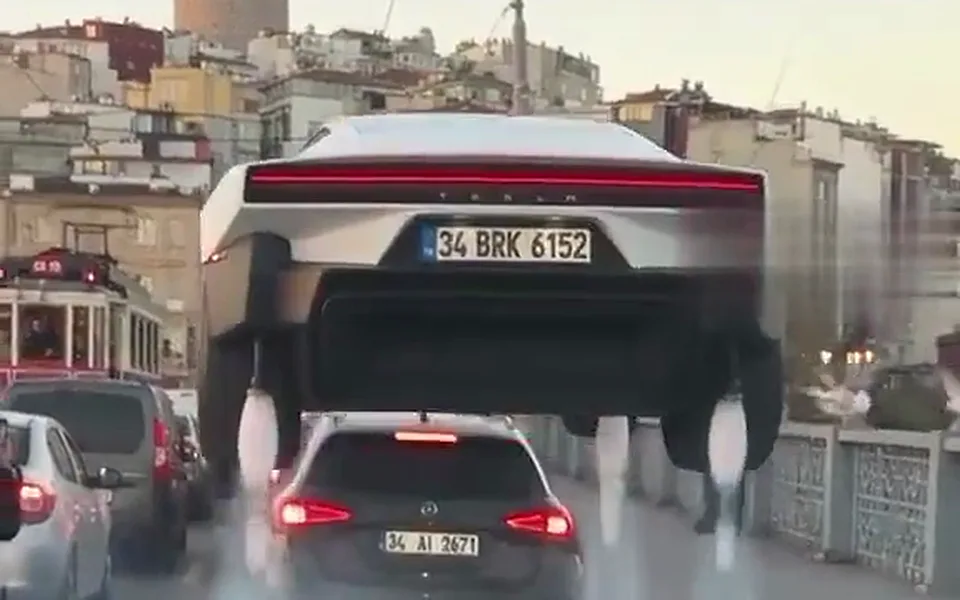
The remixes people liked most after the demo were not stunts on a test track but daydreams from a commute: a car stuck on a bridge that simply lifts off and floats over everyone. Hover Over Traffic puts you in the driver seat for that one. You press a glowing HOVER button, the car rises on white thrust jets, glides over the jam and lands on the empty road ahead.
Tips for the hover over traffic
- A head-and-shoulders photo is enough: you are seen through the windscreen and in close-up.
- Face the camera in the photo; the last shot is you looking back and grinning.
- Choose 9:16: the rise over the cars reads best in a tall frame, like the clips it comes from.
What is already set for you
- The subject: a sleek, smooth, unbadged pearl-white electric two-door car with a glass roof and four small white cold-gas thrust jets under the body, the person from Image 1 in the driver seat and clearly visible. A small glowing red button on the dashboard is marked HOVER, the only readable word in the clip..
- The scene: a packed multi-lane city bridge at golden hour, bumper-to-bumper traffic in every lane, warm haze, old buildings and a tram in the background.
- The timing: Every ramp ride leaves the top of the ramp at six seconds and lands by nine. The four flight rides have no ramp and follow their own timeline.
You do not write any of this. How the built-in prompt works.
Other rides
- Bike Ramp Flip: the bicycle remix: you on a city bike, up the ramp, over the top
- Your Car Takes Flight: your own car up the inverted ramp, flipped and landed
- Drive the Flying Supercar: you at the wheel of a low two-seat supercar, roof open
- Pet Kickflip: your dog or cat on a skateboard, up the ramp and over
- Hop the Traffic: your car leaves the ramp and glides on thrust jets, no flip
- Neon Beach Night: you in a pink-and-teal 80s beach city, flying before the game came out
- Police Chase Escape: your car outruns a night police chase and flies over the roadblock
- Skyline Flight: your car flies between skyscrapers above a city at night
- Rush Hour in the Sky: you wave from a flying car stuck in a sky full of flying cars